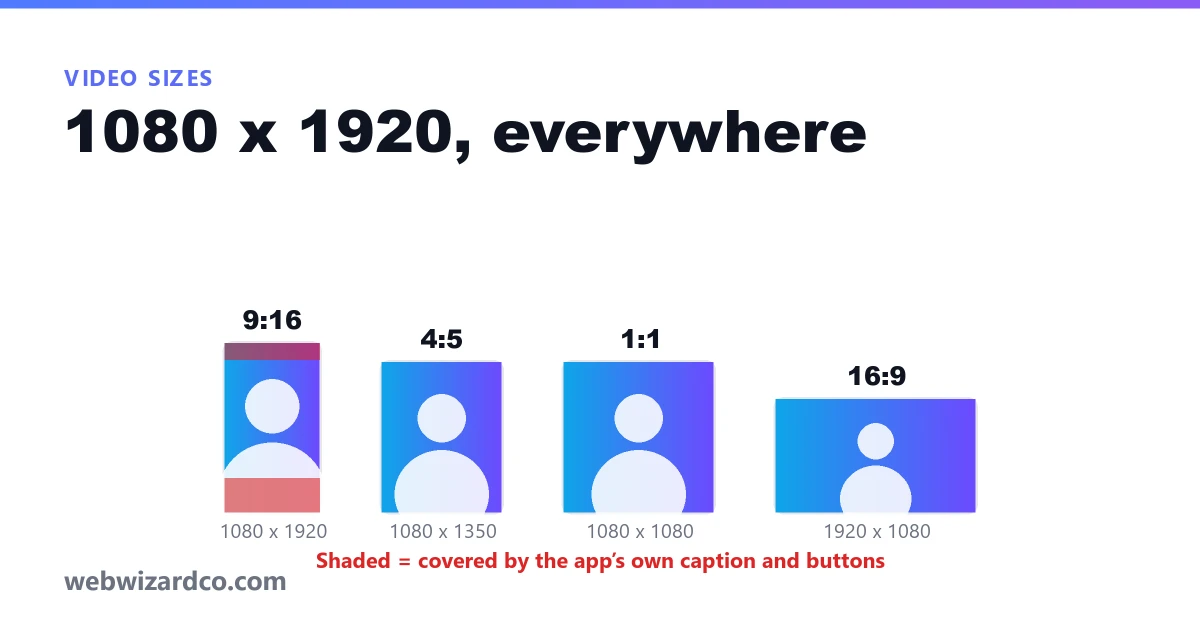
There is a lot less to this than the number of articles about it suggests. Every major vertical platform wants the same frame, in the same format. What differs is the length each allows, and — more importantly — how much of your picture their interface sits on top of.
The one size that works everywhere
1080 x 1920, 9:16, MP4 with H.264 video and AAC audio. That covers Instagram Reels, YouTube Shorts and TikTok. You do not need a separate export for each.
A few notes on that:
- Going above 1080p rarely helps. All three re-encode what you upload. A 4K vertical export mostly buys you a longer upload and a bigger file.
- 720 x 1280 is an acceptable floor if your source is small or your device struggles. Below that, text starts to look soft.
- 30fps is fine for talking-head content. Use 60 only if there is real motion worth it.
- WebM is not accepted by Instagram or TikTok. If your editor exports WebM, convert it.
The other shapes, and when to use them
| Shape | Pixels | Use it for |
|---|---|---|
| 9:16 | 1080 x 1920 | Reels, Shorts, TikTok, Stories — the default vertical |
| 4:5 | 1080 x 1350 | The tallest shape the Instagram feed allows; takes up more screen than square without being a Reel |
| 1:1 | 1080 x 1080 | Square posts, and anywhere a video has to look the same in a feed and a grid |
| 16:9 | 1920 x 1080 | Standard YouTube, embeds, anything watched on a desktop |
Safe areas: the part that actually ruins clips
Your video is 1080 x 1920, but a meaningful slice of it is underneath the platform's own interface. On a vertical feed, roughly the bottom fifth of the frame carries the caption, the account name and the action buttons, and the top tenth can carry a header or the progress bar.
That means anything you care about — a face, a price, a call to action, your own captions — belongs in the middle. In practice: keep important content between about 8% and 80% of the way down the frame. If you put a lower third at the actual lower third, the share button will be sitting on it.
This is the single most common mistake in reposted clips, and it is invisible in your editor. Our reel maker draws the safe area over the preview so you can see what the app will cover before you export.
Length limits
These change more often than the dimensions do, so treat them as a guide and check before you plan something long. At the time of writing, Instagram Reels and YouTube Shorts both accept up to about three minutes, and TikTok allows considerably more.
The limits are not the target. Short-form watch-through rate falls off a cliff as length grows, and a thirty-second clip that holds to the end will almost always beat a two-minute one that loses people at twenty seconds. Use the length you need, not the length you are allowed.
File size and upload
A thirty-second 1080 x 1920 clip at a sensible bitrate lands somewhere around 5 to 15 MB, which is well inside every platform's limit. If yours is dramatically bigger, your bitrate is higher than the platform will keep after re-encoding anyway.
Getting an existing video into the right shape
If what you have is 16:9, you are not resizing so much as re-deciding what stays in frame. That is a composition question rather than a numbers question, and it is covered in cropping 16:9 to 9:16. For images rather than video, the equivalent reference is our guide to social media image sizes.